Email Notifications Not Arriving? Here's How to Fix It
Email Notifications Not Arriving? Here's How to Fix It
You expected an email from Ripluo - a task assignment, a mention, an invite - and it never showed up. Work through these checks in order; the first three solve almost every case.
1. Check Your Plan
Email notifications for activity (mentions, task assignments, messages) are included on Plus and higher plans. On the Free plan you still get every notification inside the app - the bell icon in the top bar - but activity emails are not sent. Transactional emails like team invites, planner invites, and billing receipts go out on every plan, including Free.
2. Check Your Notification Preferences
Open Settings (your profile tab) and scroll to Notification Settings. One common cause is simply that email delivery is switched off. Two things to check:
- Enable Email Notifications - the master switch that turns all email notifications on or off.
- Email Frequency - set to Off (no emails), Mentions Only (emails only when someone @mentions you), or Instant (emails for all enabled types).
Above those, the In-App Notifications toggles control each type individually: Event Messages (mentions in event group chat), Task Mentions, and Task Discussion Updates. If a type is switched off there, you will not get its emails either.
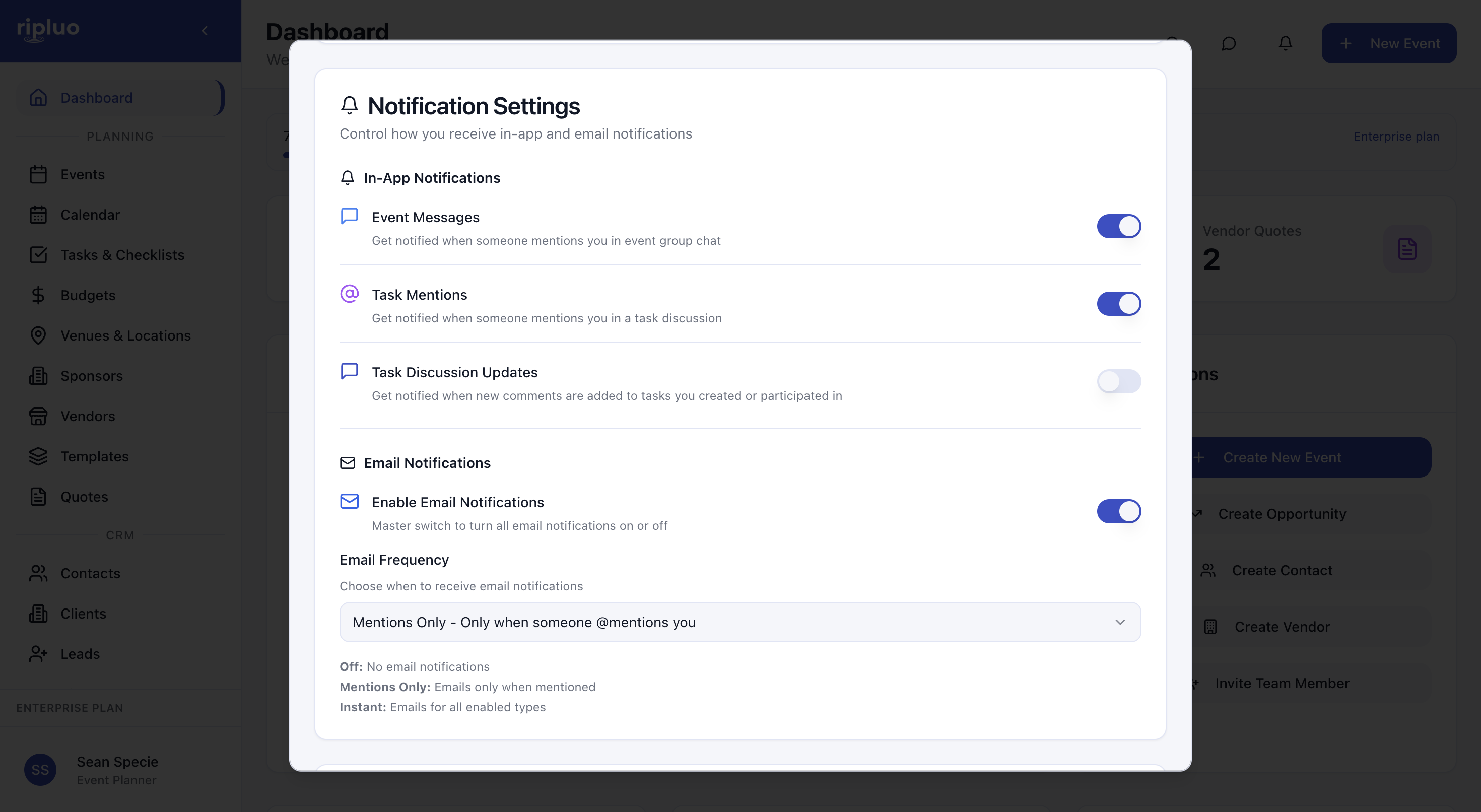
If you only want the important stuff, Mentions Only is the middle ground: you get an email when someone @mentions you, and everything else stays in-app.
3. Check Spam and Whitelist the Sender
Ripluo's emails come from noreply@mail.ripluo.com. Search your spam or junk folder for that address. If you find Ripluo mail there, mark it as "Not spam" and add the address to your contacts - that trains your mail provider for next time. On a company domain, ask IT to whitelist mail.ripluo.com.
4. Missing Invite Emails
If a teammate says they never got an invitation: confirm you sent it to the right address (typos are the top cause), then have them check spam for noreply@mail.ripluo.com. The invite is also not lost - if they sign up directly with the invited email address, the pending invitation is applied to their new account automatically.
5. Missing Billing Receipts
Receipt emails go only to the account owner. If you are an admin or member, you will not receive them - ask your owner, or the owner can find every receipt under Settings > Billing.
Still Not Working?
Click the feedback icon in the top bar of the app and choose Chat with our team. Tell us which email you expected and when, and we will check the delivery logs from our side.