How to Run a Successful Event Business Flywheel
The event business flywheel turns every event into your next lead. Here's the 10-stage system event planners, wedding planners, DJs, venues, and photographers use to grow through referrals, proposals, contracts, and repeat clients - powered by Ripluo.
The event business flywheel is a continuous growth system where every stage of client work - planning, execution, reviews, referrals, and new sales - feeds the next. Unlike a linear sales funnel that ends at the sale, a flywheel treats a delivered event as the start of the next one. Great events create raving fans, who create referrals, who become new leads, who become new events. The wheel spins faster the more you run it.
This guide is for event planners, wedding planners, conference planners, DJs, venues, and photographers. It shows you the 10 stages of a working event business flywheel and how to run every stage inside one platform (Ripluo) instead of stitching together five.
If you are not a planner yet and still figuring out how to start, read our step-by-step guide on how to become an event planner in 2026 first, then come back to the flywheel once you have your first client.
Why the Flywheel Beats the Funnel for Event Businesses
The traditional sales funnel was built for products you sell once and forget. Event businesses do not work that way. A wedding planner's best lead source is the bridesmaid at last year's wedding. A conference producer's biggest revenue line is the returning sponsor. A DJ's busiest Saturdays come from the bride whose reception went viral on her cousin's Instagram.
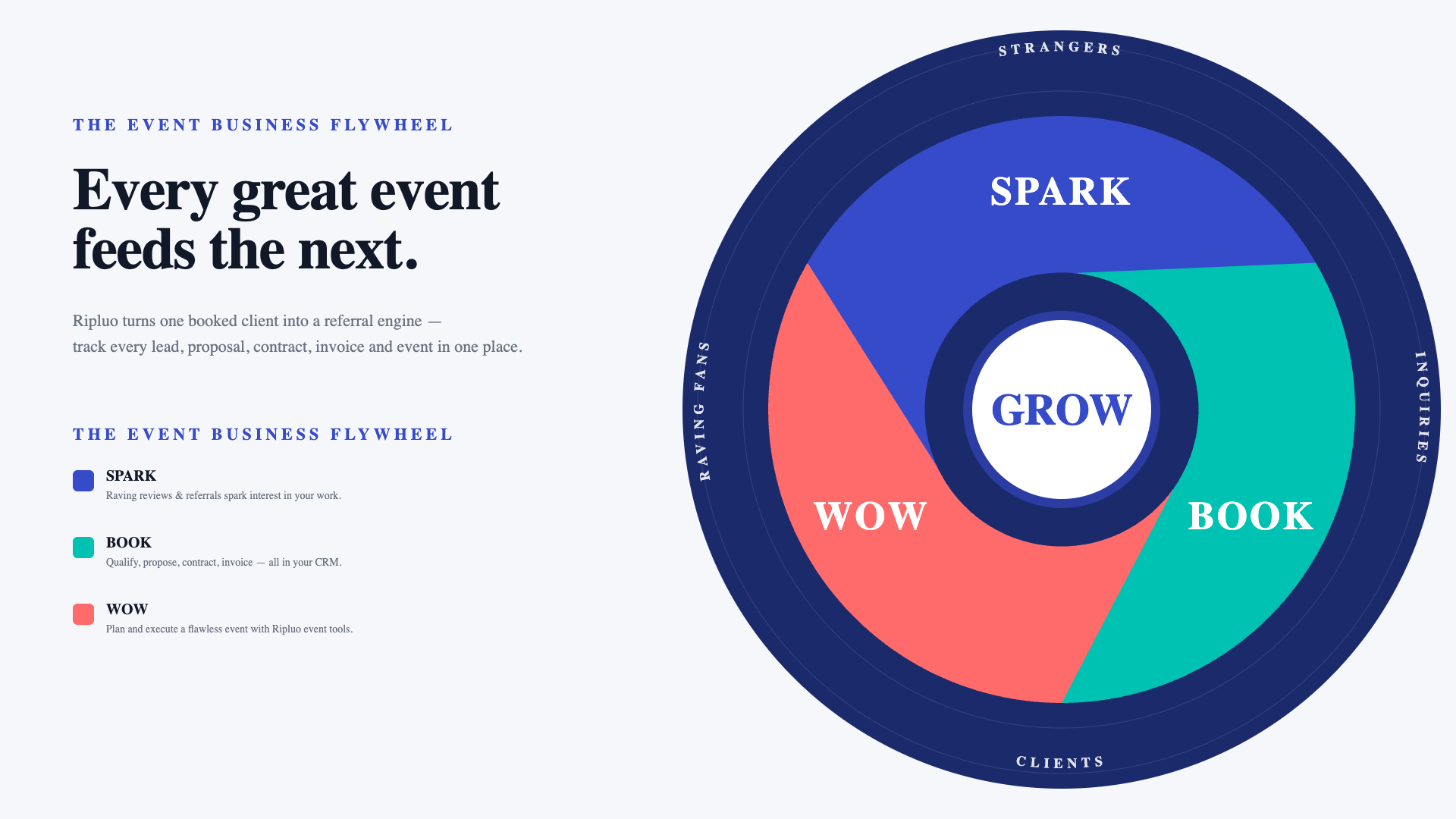
HubSpot introduced the flywheel model in 2018 to replace the funnel. The idea is simple: customers are not an output of marketing, they are an input. Happy customers attract new customers. The flywheel centers growth at the hub and shows three continuous motions around it.
We adapted the model for event businesses and named the three motions in plain English:
- WOW - Plan and execute a flawless event with Ripluo's event tools.
- SPARK - Raving reviews and referrals spark interest in your work.
- BOOK - Qualify, propose, contract, invoice, and convert the deal into a new event. All in your CRM.
At the center of the wheel is GROW. That is what happens when all three motions work together.
Event businesses are the purest example of why this model works. Industry data consistently shows that 50 to 70 percent of a professional planner's bookings come from past clients and referrals. If your business does not have a system for turning events into new leads, you are leaving the majority of your growth on the table.
Every event you deliver is either slowing the wheel down or speeding it up. Your job is to build a system that makes speeding it up the default.
The Ripluo Event Business Flywheel (The 10 Stages)
Here is the full 10-stage flywheel, grouped into the three motions (WOW, SPARK, BOOK) that feed GROW at the center. Every stage has a home inside Ripluo so you are not copy-pasting client details across five tools.
WOW: Stages 1 and 2 (Plan and Execute)
Stage 1: Plan the event. This is where most of your actual work happens. Build your timeline, track the budget, assign the tasks, design the floor plan, wrangle the guest list. Ripluo gives you one workspace per event with every planning tool included on every plan. See event planning tools for the full breakdown.
Stage 2: Execute the event and do a great job. The wheel only spins if this step is excellent. Use run-of-show timelines with team instructions at each moment, so your coordinators, vendors, and assistants know exactly what to do and when. Export staff-specific runsheets so nobody is asking "what's next?" during the event. See team coordination.
SPARK: Stages 3 and 4 (Reviews and New Leads)
Stage 3: Get raving reviews and referrals. The window to ask is 48 to 72 hours after the event, while the memory is still fresh. Send a thank-you message that includes a direct link to your Google Business Profile review, a short testimonial form, and a referral ask. Do this every single time. Planners who ask consistently get reviews consistently.
Stage 4: New leads come in. Those reviews and referrals start attracting new inquiries through your website, social posts, and word of mouth. Put a lead capture form on your site so nothing lands in a forgotten inbox. Every Ripluo plan includes a lead capture form that deposits new inquiries directly into your CRM as contacts and opportunities, already tagged by source. See how to automate event business lead capture.
BOOK: Stages 5 through 9 (Qualify to Convert)
Stage 5: Qualify the lead and track the conversation. Not every inquiry is a good fit. Ask the right questions up front (the next section lists them), then log every email, text, and call against the opportunity in your sales pipeline. You should be able to open any deal and see the full conversation history without digging through inboxes. See CRM strategies every event professional needs.
Stage 6: Send a proposal. Your proposal is the first document that shows you understand the client's goals. Structure it around their problem first, your services second. Ripluo's proposal builder auto-fills client and event details from the opportunity, so you are not retyping names and dates. See how to write event proposals that win business.
Stage 7: Client approves, so send the contract. The moment the client says yes to the proposal, send the contract the same day. Every hour you wait is an hour they can change their mind. Ripluo contracts auto-fill from the same opportunity data the proposal used, and Pro-tier plans include e-signatures with email verification so the close is fully online. See digital contracts and the event planner's guide to digital contracts.
Stage 8: Contract signed, so send the invoice. Send the deposit invoice the same day the contract is signed. Clients feel most committed in the hours after they sign. Ripluo invoices connect to Stripe on Plus and Pro, so clients can pay online with a card. Payment schedules let you bill the deposit now and the balance closer to the event.
Stage 9: Invoice paid, so convert the deal into an event. This is the hinge of the entire flywheel. One click inside the opportunity creates a full event workspace with the client's name, event date, guest count, budget, venue, notes, and linked contacts already pre-populated. Nothing retyped, nothing lost in translation. See how deal-to-event conversion works.
Then the wheel loops back to Stage 1. Either for this same client's next event, or for the new lead their review just sent you.
The Qualifying Questions That Actually Book Events
Stage 5 is where most small event businesses lose time. They send proposals to everyone who inquires, then wonder why their close rate is low. Ask these questions on the first call or in the lead form. The answers tell you whether to send a proposal or politely decline.
- What type of event is this and what is the date? If the date is unavailable, everything else is moot.
- What is your target guest count? This frames every other number.
- What is your overall budget range? Ask for a range, not a number. "Somewhere between 15k and 25k" is a real answer. "Whatever it costs" is a red flag.
- Have you booked a venue, or are you still looking? Unbooked venues add weeks to your timeline.
- Who are the decision-makers? If you are talking to someone who needs to "check with" three others, build that into your proposal timing.
- When do you need to make a decision? Clients who need to decide this week are serious. Clients with no timeline are browsing.
- What would make this event a success for you? This is the question most planners skip. The answer is the thesis of your proposal.
- Have you worked with an event professional before? First-timers need more education in the proposal. Repeat clients need more differentiation.
- Where did you hear about us? Tracks your source attribution so you know which flywheel stage is spinning hardest.
Good qualifying saves hours on proposals that will not close and signals to the client that you run a professional operation.
Why Deal-to-Event Conversion Is the Flywheel's Hinge
Most CRMs stop when the deal closes. Most planning tools start with a blank slate. That handoff is where data goes to die. Client names get misspelled, budgets get halved because someone forgot the tax line, the timeline references a 6pm ceremony when the contract locked in 5:30pm.
Inside Ripluo, the deal does not end when it closes. It converts. One click on a won opportunity creates a full event workspace with every field pre-populated from the deal: client name, email, phone, event date, venue, guest count, budget, proposal line items, and the full activity history. Your planning tab opens with the client's entire context already loaded.
This is the moment the wheel speeds up. The handoff that costs competitors hours of re-entry and days of clarification emails costs you one click. Multiply that across a year of events and you have given yourself back weeks. See deal-to-event conversion in action or read the primer on what an event CRM is and why generic CRMs fail planners.
How the Flywheel Looks for Different Event Businesses
The 10 stages stay the same. The details change based on what you plan.
Wedding Planners
Your flywheel is fueled by bridesmaid referrals, venue partnerships, and Instagram tags. Lead capture should mention your style and price point so you are not qualifying on every call. Send proposals within 48 hours of the inquiry call. Your contract-to-invoice sequence should feel effortless because your clients are making the biggest-stakes decision of their year. See Ripluo for wedding planners.
Conference and Corporate Event Planners
Your wheel is longer. RFPs, multi-stakeholder approvals, and procurement reviews slow the BOOK stages. Compensate by over-tracking every conversation in the CRM so you can hand off between colleagues without losing context. Build proposal templates that speak to ROI and risk mitigation, not vibes. See Ripluo for corporate event planners.
DJs and Entertainment Companies
I run CoastalSpark Entertainment on the side, so I know this one firsthand. You are doing 100 to 200 events a year with zero time for proposal theatrics. Your flywheel needs to be fast: a lead form that qualifies in 5 questions, a proposal template that ships in under 10 minutes, a contract the client can sign on their phone, and a deposit invoice with a payment link. Ripluo's reusable templates plus auto-fill make this workable. See Ripluo for event professionals.
Venues
Your inquiries are constant and your close rate depends on how fast you can send a professional proposal with your floor plans, pricing tiers, and availability. Use proposal templates that let you swap pricing tiers without rewriting the whole document. Your contracts are the heart of your business. Keep every signed agreement searchable in one place.
Photographers
Your flywheel is tighter than most planners realize. Every wedding photographer is also a CRM. You quote, contract, deliver, and get referred constantly. A free CRM that speaks events rather than generic "projects" is a significant upgrade over the spreadsheet and email stack most photographers run on today.
How to Build Your Flywheel in Ripluo (Action Steps)
- Set up your pipeline stages. Default stages work for most (New Lead, Qualified, Proposal Sent, Contract Sent, Won, Lost). Customize when you have a reason to.
- Build your proposal, contract, and invoice templates once. Use auto-fill fields for client name, event date, venue, and pricing so every future send is a 2-minute job.
- Install a lead capture form on your website. Every Ripluo plan includes one. Embed it on your contact page and your pricing page.
- Run your next event in Ripluo. Timeline, budget, tasks, team, floor plan. Do not use a separate tool for any of it. The wheel is smoother when everything lives together.
- Ask for the review and referral 48 hours after the event. Make it a template. Send every time. No exceptions.
- Review your flywheel monthly. Which stage is slowest? Proposals sitting too long? Invoices aging? Reviews not coming in? Fix the slowest stage first.
Frequently Asked Questions
What is the event business flywheel?
The event business flywheel is a continuous growth system where every stage of client work (planning, execution, reviews, referrals, and new sales) feeds the next stage. Unlike a linear sales funnel that ends at the sale, a flywheel treats a delivered event as the starting point of the next one. Great events create raving fans, who create referrals, who become new leads, who become new events.
How is a flywheel different from a sales funnel?
A funnel is linear and ends at the sale. A flywheel is circular and treats every sale as the start of the next one. For event businesses where 50 to 70 percent of revenue comes from repeat clients and referrals, the flywheel is a more accurate model because it recognizes that your happiest clients are your best marketing channel.
Do I need a CRM to run a flywheel as an event planner?
Technically no, but practically yes. You can run the flywheel in spreadsheets if you are doing under 10 events per year. Above that, you need a CRM to track the qualify, proposal, contract, and invoice stages without losing leads. Generic CRMs like Salesforce and HubSpot are overkill and do not understand events. An event-specific CRM like Ripluo connects your sales data directly to your event workspaces.
Is this included in Ripluo's free plan?
Yes. Ripluo's free plan includes event planning tools (timelines, budgets, tasks, floor plans), basic CRM (100 contacts, 10 deals, 10 proposals, 10 quotes, 10 invoices), a lead capture form, and Buildr AI with 10 monthly credits. You can run a full flywheel on the free plan as you build momentum. Paid plans lift limits and add features like online payments (Plus), e-signatures, and AI CRM tools (Pro). See Ripluo pricing.
How do I get clients to leave reviews and referrals?
Ask consistently, ask early, and ask specifically. Send a templated thank-you message 48 to 72 hours after the event with three links: a direct link to your Google review, a short testimonial form, and a referral ask with a specific prompt (who do you know getting married or planning a conference?). Planners who ask every time get reviews every time. Planners who ask sometimes get reviews rarely.
How does Ripluo convert a won deal into an event?
Inside any opportunity in your pipeline, click the Convert to Event button. Ripluo creates a new event workspace pre-populated with the client's name, contact details, event date, venue, guest count, budget, proposal line items, and full activity history from the deal. No re-entry, no spreadsheet export, no lost context. One click takes you from closed-won to ready-to-plan. See how the CRM and events connect.
Start Your Flywheel Today
Every stage of the event business flywheel runs inside Ripluo, and CRM is now included on every plan, including Free. Build your next event, win your next client, and watch the wheel start spinning.
Start Planning with Ripluo or view the full pricing breakdown.